Monitor your apps and infrastructure with WaveFront (beyond APM): Use Cases and Solutions

In this blog, I will cover a quick introduction of WaveFront/Tanzu Observability (TO) and a couple of use cases and real challenges which can be solved using this:

What is WaveFront Tanzu Observability (TO)?

Monitor full-stack applications to cloud infrastructures with metrics, traces, span logs, and analytics. It provides extra features beyond any other APM tool

https://tanzu.vmware.com/observability

WaveFront is an APM tool and provides additional features beyond APM for monitoring your modern cloud native microservice applications, infrastructure, VMs, K8s clusters, and alerting in real-time, across multi-cloud, Kubernetes clusters, and on-prem at any scale. Traditional  tools and environments make it challenging and time consuming to correlate data and get visibility thru a single plane of the glass or dashboard needed to resolve incidents in seconds in critical production environment. It’s a unified solution with analytics (including AI) that ingests visualizes, and  analyses metrics, traces, histograms and span logs.  So you can resolve incidents  faster across cloud applications.

Features:

  • It can work with existing monitoring solutions open-sources like Prometheus, Grafana, Graphite
  • It has integration almost all popular monitoring solutions on VM and containers, SpringBoot, Kubernetes, messaging platforms, RabbiMQ, Databases etc.
  • It monitors containers and VMs stats
  • It captures all microservices APIs traces, usage and performance with topology view by it’s powerful service discovery features
  •  It maintains versions of charts and dashboards
  • Currently it stores and archive old monitoring data for analytics purposes

High Level Technical Architecture

WaveFront use cases:

  • Multicloud visibility (mostly data center, moving to public cloud)
  • Application monitoring (+ tooling for Dev and Ops visibility)
  • Service performance and reliability optimization (assess-verify)
  • Observability and diagnostics of multi-cloud and on-prem K8s clusters
  • Business service performance & KPIs
  • App metrics: from New Relic, Prometheus and Splunk
  • Multicloud metrics: from vSphere, AWS, Kubernetes
  • All data center metrics: from compute, network, storage
  • Reliability and high availability operations
  • App and Infrastructure monitoring , analytics dashboards
  • Auto alerting mechanism for any production bug or high usage of infrastructure (CPU, RAM, Storage)
  • Instrument and monitor your Spring Boot application in Kubernetes
  • Other Tanzu products monitoring
  • System-wide monitoring and incident response – cut MTTR
  • Shared visibility across biz, app, cloud/infra, device metrics
  • IoT optimization with automated analytics on device metrics
  • Microservices monitoring and troubleshooting
  • Accelerated anomaly detection
  • Visibility across Kubernetes at all levels
  • Solving cardinality limitations of graphite
  • Easy adoption across hundreds of developers
  • System-wide monitoring and incident response – cut MTTR
  • Shared visibility across biz, app, cloud/infra, device metrics
  • IoT optimization with automated analytics on device metrics
  • AWS infrastructure visibility (cost and performance)
  • Kubernetes monitoring
  • Visualizing serverless workloads
  • Solving Day 2 Operations for production issues and DevOps/DevSecOps
  • Finding hidden problems early and increase SLA for service ticket resolution
  • Application and microservices API monitoring
  • Performance analytics
  • Monitoring CI/CD like Jenkins Environment with Wavefront

Live WaveFront Dashboard

References

Generic Demo Video -1

MicroServices Observability with WaveFront Demo Video -2

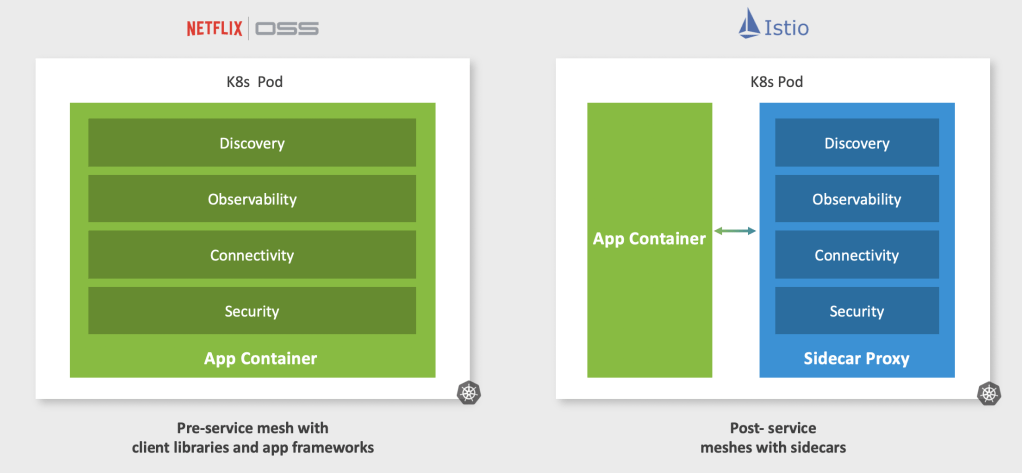
Tanzu Service Mesh (TSM) based on Istio : Use Cases & Solutions

In this blog, I will cover a quick introduction of TSM and a couple of use cases and real challenges which can be solved using this :

What is Tanzu Service Mesh (TSM)?

Radically simplify the process of connecting, protecting, and monitoring your microservices across any runtime and any cloud with VMware Tanzu Service Mesh. Provide a common policy and infrastructure for your modern distributed applications and unify operations for Application Owners, DevOps/SREs and SecOps without disrupting developer workflows.

https://www.vmware.com/in/products/tanzu-service-mesh.html

Tanzu Service Mesh is K8s operator side microservice orchestration tool to manage service discovery, traffic, mTLS secure payload, rate limiting, telemetry, observability of VM, microservices and circuit breaker across multi-clouds. Open-source service mesh technologies like Istio exist to help overcome some of the challenges around building microservices such as service discovery, mutualTLS (mTLS), resiliency, and visibility. However, maintaining and managing a service mesh like Istio is challenging, especially at scale.


It provides unified management, global policies, and seamless connectivity across complex, multi-cluster mesh topologies managed by disparate teams. It provides app-level observability across services deployed to different clusters, complementing/integrating into modern observability tools you use or are considering.

TSM Global NameSpace Architecture

As of now, only this enterprise product has this powerful feature to provide a global namespace for multi K8s clusters across multi-clouds . Istio open source doesn’t provide this feature.

TSM use Cases

  • Service discovery for multi Kubernetes clusters in different namespaces or multi-cloud using GNS
  • Distributed Microservice Discovery on multi-cloud
  • Traffic Monitoring and API communication tracing
  • Logging and K8s Infra Monitoring with admin dashboard visualization
  • Rate Limiting with the help of Redis
  • Business Continuity (BI)
  • Developer is responsible to provide all service- related configuration thru boiler-plate code
  • Secure Payload
  • Netflix OSS APIs (Eureka service discovery, Zuul API gateway, Ribbon- Load balancing, caching etc) , Hystrix (Circuit breaker) are legacy and no enterprise support, also its tightly coupled with application development source code
  • Open source Istio has no enterprise support as of now
  • Visibility for DevOps and DevSecOps

References

  1. Doc – https://docs.pivotal.io/pks/1-7/nsxt-service-mesh.html
  2. Public doc- https://tanzu.vmware.com/service-mesh

Demo  for Microservices:

Tanzu Mission Control (TMC) for multi-cloud: Use Cases & Solutions

In this blog, I will cover a quick introduction of TMC and a couple of use cases and real challenges which can be solved using this :

What is Tanzu Mission Control (TMC)?

Operate and secure your Kubernetes infrastructure and modern apps across teams and multi clouds (on-prem, private, public, hybrid Kubernetes clusters.

https://tanzu.vmware.com/mission-control

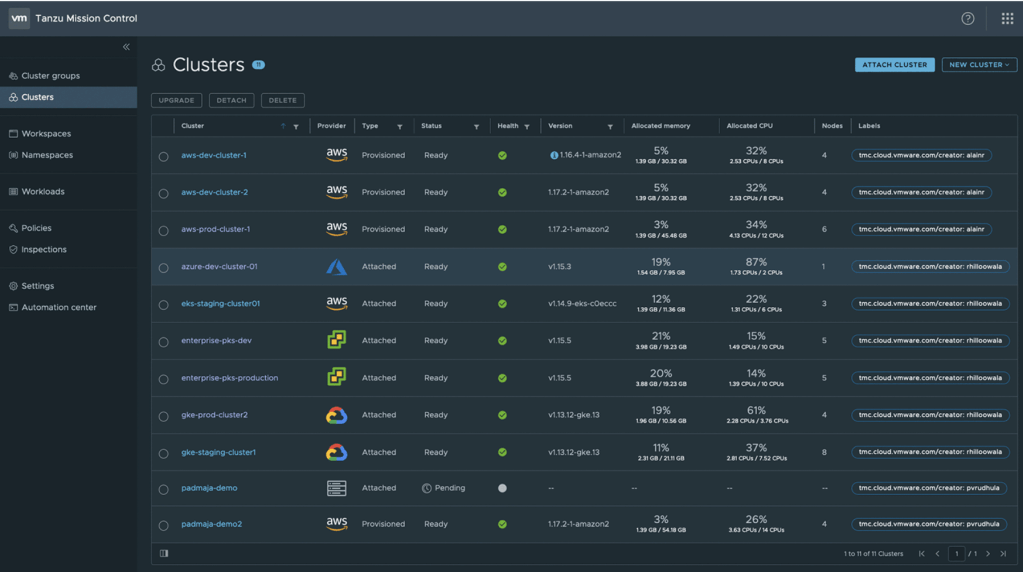
VMware Tanzu Mission Control provides a single control glass of plane to easily provision and manage Kubernetes clusters and operate modern, containerized applications across multiple clouds and clusters. It works as a management cluster or Kubernetes control plane which provision and manage multi-clusters worker/data nodes including deploying and upgrading clusters, setting RBAC, security and other policies and configurations, monitor the health of clusters (VMs and K8s ) and provide the root cause of underlying production issues.

TMC Use Cases

  • Multi-cloud management of on-prem, public, hybrid cloud
  • Centralized Control Plane for provisioning K8s cluster for public cloud and on-prem
  • Centrally operates and manages all your Kubernetes clusters and applications at scale
  • App and service management
  • Enables developers with self-service access to Kubernetes for running and deploying applications
  • Manage security and configuration easily and efficiently through powerful policy engine like RBAC and inspection

References

Demo Video

Scale Spring Batch, comparison with Spring Cloud Task & best practices of Spring Batch!

Disclaimer: This blog content has been taken from my latest book:

“Cloud Native Microservices with Spring and Kubernetes”

Comparison of Spring Cloud Task vs Spring Batch

  • Spring Cloud Task is complimentary of Spring Batch.
  • Spring Batch can be exposed as a Spring Cloud Task.
  • Spring Cloud Task makes life easy to run and Java/Spring microservice applications that do not need the robustness of the Spring Batch APIs.
  • Spring Cloud Task has good integration with Spring Batch and Spring Cloud Data Flow (SCDF). SCDF provides features of batch orchestration, and a UI dashboard to monitor Spring Cloud Task.
  • In nutshell, all Spring Batch services can be exposed/registered as Spring Cloud Task to have better control, monitoring, and manageability.

Best practices for Spring Batch:

  1. Use an external file system (Volume Services) for the persistence of large files with Cloud Foundry (PCF)/ Tanzue Application Services (TAS) due to file system limitations. Refer to this link.
  2. Always use SCDF abstraction layer with UI dashboard to manage, orchestrate, and monitor Spring Batch applications.
  3. Always use Spring Cloud Task with Spring Batch for additional batch functionality.
  4. Always register and implement vanilla Spring Batch applications as Spring Cloud Task in SCDF.
  5. Use Spring Cloud Task when you need to run a finite workload via a simple Java micro-service.
  6. For High Availability (HA), implement best suited horizontal scaling technique from the top scaling techniques based on the use cases on containers (K8s).
  7. For large PROD systems, use SCDF as an orchestration layer with Spring Cloud Task to manage a large number of batches for large data sets.
  8. App data and batch repo should live in the same schema for transaction synchronization.

Spring Batch Auto-scaling (both vertically and horizontally)

  • Vertical Scaling: No issue with that. H/w or POD size can be increased at any time based on the usage of CPU and RAM for better performance and reliability. As you give the process more RAM, you can typically increase the chunk size which will typically increase overall throughput, but it doesn’t happen automatically.
  • Horizontal Scaling: There are popular techniques, watch this YouTube video for detail and refer to this GitHub code –
  1. Multi-threaded Steps – Each transaction/chunk is executed by its separate threads, the state is not persisted, only an option if u don’t need non-resistibility. 
  2. Parallel steps – Multiple independent steps run in parallel via threads.
  3. Single JVM Async Item Writer/Item Processor. ItemProcessor calls are executed within a Java Future. The AsyncItemWriter unwraps the result of the Future and passes it to a configured delegate to write.
  4. Partitioning – Data is partitioned and then assigned to n workers that are being executed either within the same JVM via threads or in external JVMs launched dynamically when using Spring Cloud Task’s partition extensions. A good option when restart ability is needed.
  5. Remote Chunking– Mostly I/O bound, sometimes when you need more processing power beyond the single JVM. It sends actual data remotely, only useful when processing is the bottleneck. Durable middleware is required for this option.

 Spring Batch Orchestration and Composition

SCDF doesn’t watch the jobs. It just shares the same DB as the batch job does so you can view the results. Once a job is launched via SCDF, SCDF itself has no interaction with the job. You can compose and orchestrate jobs by drag and drop and set dependency between jobs, which jobs should run in parallel and which ones in sequence, execution order can also be set for multiple jobs scheduling.

 Achieve Active-Active operation for High Availability(HA) between two Data Centers/AZs

There are two standard ways:

  1. Place a shard Spring Batch Job repository between two active-active DC/AZs. Parallel sync happens in the job repository database. App data and batch repo should in the same schema for better synchronization as noted above. Transaction isolation level set by default, so that one of the active DC can run the job and another job should be failed when it tries to re-run the same job with the same parameter. 
  2. Spring Cloud Task has this built-in functionality to restrict Spring Cloud Task Instances- https://docs.spring.io/spring-cloud-task/docs/2.2.3.RELEASE/reference/#features-single-instance-enabled

Alerts and Monitoring of Spring Cloud Task and Spring Batch

  • Spring Cloud Task includes Micrometer health check and metrics  API out of the box.
  • Plain Prometheus is not suitable for jobs, because it uses a pull mechanism and it won’t tell when a job has finished or has some issues. If you want to use Prometheus for application metrics with Grafana visualization then follow this Prometheus rsocket-proxy API- https://github.com/micrometer-metrics/prometheus-rsocket-proxy

More References:

Kubernetes Orchestration using Tanzu Kubernetes Grid (TKG) : Use Cases & Solutions

In this blog, I will cover a quick introduction of TKG and a couple of use cases and real challenges which can be solved using this :

What is Tanzu Kubernetes Grid (TKG)?

Streamline operations across multi-cloud infrastructure.

https://tanzu.vmware.com/kubernetes-grid
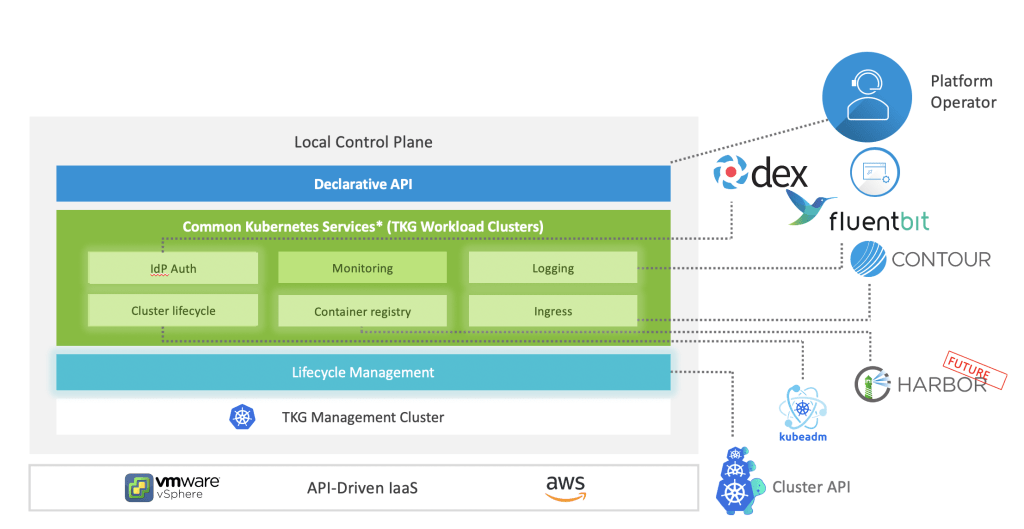
  • TKG is an enterprise Kubernetes Orchestration library to manage container and other Kubernetes cluster objects and lifecycle of K8s cluser of clusters .
  • TKG uses latest Kubernetes upstream Cluster API which manages multiple K8s clusters lifecycle.
  • It can spawn to multi nodes/VMs.
  • Running K8s containers at scale in production – especially for mission critical workloads in day 2 operation- gets very complex.  Hard to manage a Kubernetes runtime consistently and securely, especially if you are running in multiple DCs / AZs on cloud.
  • TKG provides enterprises with a consistent, upstream aligned, automated multi-cluster operations across SDDC, Public Cloud, and Edge environments that is ready for end-user workloads and ecosystem integrations.
  • TKG does for Kubernetes what Kubernetes does for your containers.
  • It provides integrations with public cloud like AWS and also open sources support:
    • Harbor – Image Registry
    • Concourse – CI/CD pipeline tool
    • Velero – K8s backup
    • Contour – K8s Ingress Controller
    • KubeAdm – Manage cluster lifecycle
    • dex – idP Authentication/ UAA
    • Sonobuoy – diagnostic tool
    • WaveFront (TO)
    • APMs- Prometheus with Grafana, Wavefront and other APM tools,ELK, FluentBit
    • Calico CNI with NSX-T for VM

TKG use cases

  • Kubernetes Orchestration for multi-cloud and multi-clusters and manage life cycle of multiple clusters
  • Platform Automation of managing cluster of K8s clusters
  • High Availability, Auto-scalability
  • Consistent Kubernetes across environments
  • Kubernetes open source alone is not enough
  • Day2 Operations Patching, Upgrade etc.
  • Overhead of access, networking, security policies applied cluster-by-cluster
  • Public cloud vendor lock-in
  • Manual configuration and management, siloed by environment on-prem and public cloud
  • On-prem management is critical

References

Ref Doc- https://docs.vmware.com/en/VMware-Tanzu-Kubernetes-Grid/index.html

Bitnami Tanzu Application Catalogue (TAC) : Use Cases & Solutions

In this blog, I will cover a quick introduction of TAC and a couple of use cases and real challenges which can be solved using this :

What is Tanzu Bitnami Application Catalogue (TAC)?

Curate a catalog of production-ready open-source software from the Bitnami collection.

https://tanzu.vmware.com/application-catalog

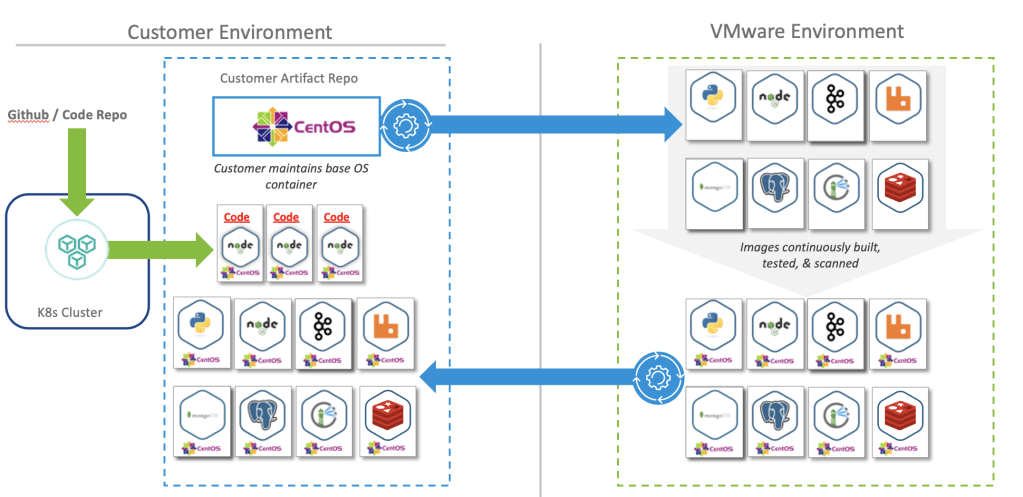
Bitnami Application Catalogue (TAC) is a secure, curated Kubernetes docker images for the popular APIs and libraries to build, run, manage and secure cloud native docker images. It does CVE, virus scanning and always keep secure updated golden images in it’s central SAAS repo. It’s builds. docker images based on OS for CI/CD deployment on Kubernenes.

Why Bitnami Tanzu Application Catalogue (TAC)?

Working with pre-packaged software, that impose security vulnerability, risk and challenges. Developers are sourcing containers from public Docker Hub that are out of date, vulnerable, insecure by default, or broken. Auditing, hardening, integrating, and making software ready for production is time consuming, difficult, and low value add from an organizational standpoint. It’s also frustrating to dev teams as software selection will be limited and forced to opt open source options.

TAC use Cases

  • Keep images up to date with regular patching and updates
  • Manage golden images privately on preferred OS
  • Regular security scan for viruses and vulnerabilities
  • Manage/sync images on their on-prem private image repository using Harbor
  • Non-secure images
  • No enterprise support for regular updates and security patching
  • No virus and CVE scan and transparency of scan reports
  • Hard to manage preferred OS based images and configuration

References

  1. Available stacks – https://bitnami.com/stacks
  2. How to start and use – https://docs.bitnami.com/tanzu-application-catalog/
  3. FAQ- https://docs.bitnami.com/tanzu-application-catalog/faq/

Demo Video

10 Challenges and Solutions for Microservices

I have posted this same blog on Dzone on July 2, 2018. This one is the latest version:

Transitioning/implementing to microservices creates significant challenges for organizations. I have identified these challenges and solution based on my exposure to microservices in production. 

These are the ten major real challenges of implementing microservices architecture and proposed solutions:

1. Data Synchronization (Consistency) — Event sourcing architecture can address this issue using the async messaging platform. The SAGA design pattern can address this challenge.

2. Security — An API Gateway can solve these challenges. There are many open source and enterprise APIs are available like Spring Cloud Gateway, Apigee, WSO2, Kong, Okta (2-step authentication) and public cloud offering from AWS, GCP and Azure etc. Custom solutions can also be developed for API security using JWT token, Spring Security, and Netflix OSS Zuul2.

3.  Services Communication — There are the different way to communicate microservices –
a. Point to point using API Gateway
b. Messaging event driven platform using Kafka and RabbitMQ
c. Service Mesh

4. Service Discovery — This will be addressed by open source Istio Service Mesh, API Gateway, Netflix Eureka APIs. It can also be done using Netflix Eureka at the code level. However, doing it in with the orchestration layer will be better and can be managed by these tools rather doing and maintaining it through code and configuration.

5. Data Staleness — The database should be always updated to give recent data. The API will fetch data from the recent and updated database. A timestamp entry can also be added with each record in the database to check and verify the recent data. Caching can be used and customized with an acceptable eviction policy based on business requirements.

6. Distributed Logging, Cyclic Dependencies of Services and Debugging — There are multiple solutions for this. Externalized logging can be used by pushing log messages to an async messaging platform like Kafka, Google PubSub, ELK etc. Also, a good number of APM tools available like WaveFront, DataDog, App Dynamics, AWS CloudWatch etc.

It’s difficult to identify issues between microservices when services are dependent on each other and they have a cyclic dependency. Correlation ID can be passed by the client in the header to REST APIs to track all the relevant logs across all the pods/Docker containers on all clusters.

7. Testing — This issue can be addressed with unit and integration testing by mocking microservices individually or integrated/dependent APIs which are not available for testing using WireMock, BDD, Cucumber, integration testing.

8. Monitoring & Performance — Monitoring can be done using open-source tools like Prometheus with Grafana APIs by creating gauges and matrices, GCP StackDriver, Kubernetes, Influx DB, combined with Grafana, Dynatrace, Amazon CloudWatch, VisualVM, jProfiler, YourToolKit, Graphite etc.

Tracing can be done by the latest Open tracing project or Uber’s open source Jaeger. It will trace all microservices communication and show request/response, errors on its dashboard. Open tracing , Jaeger are good APIs to trace API logs Many enterprise offerings are also available like Tanzu TSM etc.

9. DevOps Support — Microservices deployment and support-related challenges can be addressed using state-of-the-art CI/CD DevOps tools like Jenkin, Concourse (supports Yaml), Spinnaker is good for multi-cloud deployment. PAAS K8 based solutions TKG, OpenShift.

10. Fault Tolerance — Istio Service Mesh or Spring Hystrix can be used to break the circuit if there is no response from the dependent microservices for the given SLA/ETA and provide a mechanism to re-try and graceful shutdown services without any data loss.

Spring Cloud API Gateway and SpringBoot: Use Cases & Solutions

In this blog, I will cover SpringBoot popularity for Microservices, use cases of SpringBoot Cloud Gateway, a couple of API use cases and real challenges of Microservices which can be solved using API Gateway.

SpringBoot first citizen for Microservices! Why?

Spring is the most popular Java framework on the market, around 60% enterprise applications run on Java, has good integration with almost all popular development libraries.Java EE is bulky and not suitable for Microservices. Different vendors are trying to run Java EE middleware in containers, but it is an anti pattern and difficult to maintain. Spring Boot Introduced in 2014 as part of Spring Framework is Micro-services ready and is the most popular  enterprise Java micro-services framework.

I am going to cover some of the SpringBoot and and SpringBoot Cloud Gateway use cases and what kind of real challenges it can solve:

SpringBoot Cloud Gateway use cases

  • API Service discovery and routing
  • A&A Security
  • API Rate limiting for clients
  • Impose common policies
  • API Caching
  • Control API traffic
  • Circuit breaker and monitoring
  • Path filtering
  • API performance for redundant data request
  • High cost and heavy H/W
  • Throttling of APIs
  • Loose security

SpringBoot Use Cases

  • Increase developer productivity
  • Manual, auto scheduled jobs/batches
  • Security for Authorization & Authentication (A&A)
  • REST API development
  • Develop cloud native applications
  • Microservices deployment on Kubernetes containers
  • API health monitoring, capture and analyse telemetry data
  • Prometheus, Grafana integration support for API performance, usage, SLA
  • SQL Data JPA and Hibernate ORM for MySQL,PostGresSQL and Oracle JDBC
  • Spring Templates for integration with Redis, RabbitMQ etc.
  • API and second level Caching
  • Spring Boot Kubernetes support
  • Application logging by using messaging queue and log forwarder
  • Faster REST API development
  • Good integration with almost all popular libraries

Spring RunTime Enterprise Support- OpenJDK, Spring, Tomcat

VMware provides enterprises support requirements for Java, OpenJDK, and Tomcat Server and Oracle is now charging for JDK fixes. Spring Runtime provides support and signed binaries for OpenJDK, Tomcat, and Spring. Also it includes, VMware’s TC Server, a hardened, curated, and enterprise ready Tomcat installation.

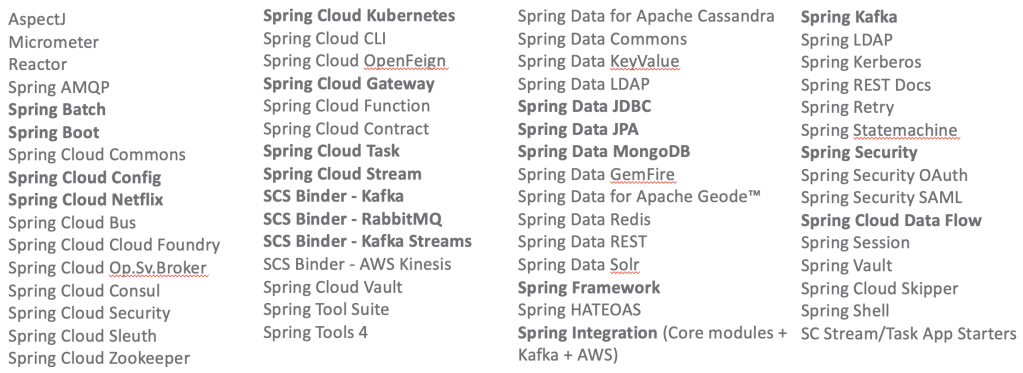
It supports all these Spring 40+ APIs binaries:

Among the application frameworks, there is a clear winner, and it’s called Spring! Both Spring Boot (No. 1) and Spring Framework (No. 2) are well ahead of the competition – especially ahead of Jakarta EE.

Source: https://jaxenter.com/java-trends-top-10-frameworks-2020-168867.html

April 2020 Status of Spring downloads and Developrs

Evolution of Java Open Sources

Play with docker image and store on Harbor and Docker-Hub

Disclaimer: This blog content has been taken from my latest book:

“Cloud Native Microservices with Spring and Kubernetes”

In this blog, I will cover how to create a simple docker image using a SpringBoot Java application, store and pull docker images using Docker-Hun and Harbor image repositories and finally how to run this app on local Docker desktop client.

Docker image registry is a persistent storage to store docker images from where it can be pulled by the CI/CD pipeline or K8s deployments and deploy on container.

Docker build services like docker, Buildpack CNB kPack,, VMware Tanzu Build Service (TBS) and other build libraries build docker images and store to docker registries and it can be updated automatically after any commit in source code repository like GitHub.

Prerequisite:

  1. Install Docker Desktop
  2. Install Harbor image registry
  3. Create Docker-Hub account
  4. Install Java
  5. Install Maven
  6. Install Git
  7. Install Homebrew

Note: This demo app has been setup and run on Mac system.

1. Install Docker Desktop:

Install Docker Desktop. The docker CLI requires the Docker daemon, so you’ll need to have that installed and running locally.

Create a Docker Hub account on https://hub.docker.com/ and get set go!

You can create docker images locally, then you have choice to push images to Docker Hub cloud SAAS or set a local Harbor private repository for security reason.

Note: Your docker desktop should be always running when you work with Docker containers like building, packaging running and persist in image registry. You can use same Docker Hub login credentials for Docker Desktop.

There are two types of Repositories:

a. Docker Hub Public repositories

This is very convenient public cloud where anyone can create their docker hub account and store docker images free.

Note: DockerHub also provides private private repository.

b. Private repositories

There are many private repositories like Harbor, jFrog, Google Container Registry, Amazon Elastic Container Registry (ECR) which are available on on-prem and on public cloud as a paid service.

I will cover Harbor private registry which is open source, can be deployed locally on-prem and it has enterprise support from VMware.

2. Install Harbor Image Registry:

There are two ways to install –

  1. Install open-source Harbor
  2. Install Harbor on Vmware TKGI (PKS)

If your Docker Desktop is already running and you have logged on your machine, then no need to provide Docker login credentials:

1. Image Registry Login:

# Docker-Hub Login:

docker login
# Harbor Login:

docker login <harbor_address>   
docker login -u admin -p <password> <Harbor Host> 

#Note: Create a Harbor project where you can store all your docker images.e g.: /library

Tip: Docker-Hub provides secret token which is advisable to use when connecting from registry or login.

2. Build Docker Image:

Create a SpringBoot micro-service project. Or you can simple clone and use this readymade Github public repo for local demo purpose:

git clone https://github.com/rajivmca2004/catalogue-service.git && cd catalogue-service

Build Docker Images using Maven

If you are using Maven and SpringBoot APP to actually build the Docker image. Go to source project folder and run this Maven command. You need to install Maven before running this command on Mac , Linux and Windows:

mvn clean install dockerfile:build

Maven command to push image to current image registry (You need to be logged in on DockerHub or Harbor on your local system:

mvn install dockerfile:push

List all Docker images:

docker image ls

Show a breakdown of the various layers in the image:

docker image history catalogue-service:latest

Note (Optional): You can also try to build image like this for non Java projects.Go to project folder of source code’s home path (in this case its Java based SpringBoot) project and run this command:

docker image build -t <Docker_Harbor_userId>/<image_name:tag> .

docker image build -t itsrajivsrivastava/catalogue-service .

3. Push Image to Docker /Harbor Registry:

a. Tag your image before pushing:

docker tag <dockerId>/image:tag

#Docker-Hub:
docker tag itsrajivsrivastava/catalogue-service itsrajivsrivastava/catalogue-service:latest

#Harbor:
docker tag itsrajivsrivastava/catalogue-service harbor.tanzu.cloudification.in/library/catalogue-service:latest

b. Now you should be able to push it:

#Docker-Hub Push (When you are logged-in to Docker-Hub thru local Docker Desktop client

#Docker-Hub:
docker push itsrajivsrivastava/catalogue-service:latest

#Harbor:
docker push harbor.tanzu.cloudification.in/library/catalogue-service:latest

4. Pull Image to docker from Docker-Hub:

docker pull <image_name>

#Docker-Hub:
docker pull itsrajivsrivastava/catalogue-service:latest

#Harbor
docker pull harbor.tanzu.cloudification.in/library/catalogue-service:latest

5. Run Docker Image

Running a Container Docker Image:

docker run -p 8010:8010 itsrajivsrivastava/catalogue-service:latest

Now, test application by –

http://localhost:8010/catalogue

Docker OCI Image, Docker Engine, Container fundamentals

Disclaimer: This blog content has been taken from my latest book:

“Cloud Native Microservices with Spring and Kubernetes”

Why Docker?

Docker is a runtime container image which contains source code + dependent libraries + OS base layer configuration. It provides portable container which can be deployed and run on any platform.

Docker is a first citizen for the Kubernetes containers. It’s a tool for developers to package all the deployable source code, dependencies and environment dependencies. DevOps can this as a tool to deploy on Kubernetes containers.

Docker: Build once and run anywhere!

Portable to all OS bases. Please refer official docs of Kubernetes containers for detail information.

Docker is more suitable to package microservices and run on any private, public and hybrid Kubernetes clusters.

Dockerization: Process to convert any source code to Docker portable image.

What is OCI Image:

The Open Container Initiative is a standard authority to standardized docker as a runtime container. It’s industry standard to around container image formats and runtimes to run faster with ease.

Note: To know more refer these links for Docker and OCI images.

What’s Docker Hub:

Docker Hub a docker image registry which is available as a SAAS service on cloud for public. They also offer paid private image repository. It’s provided easy way to start with to push and pull images from Kubernetes deployments.

What’s container:

It’s a logical small packaging of source code+dependencies+OS configuration which is required at run-time. Docker image can be run on container using runtime environment like Java runtime, Nginx etc.

Containers decouple applications from underlying host infrastructure. This makes deployment easier in different cloud or OS environments.

Container runtimes

The container runtime is the software that is responsible for running containers.

Kubernetes supports several container runtimes: Docker Engine, Containerd container runtime with an emphasis on simplicity, robustness and portabilityCRI-O, and any implementation of the Kubernetes CRI (Container Runtime Interface).

Source: https://kubernetes.io/blog/2018/05/24/kubernetes-containerd-integration-goes-ga/

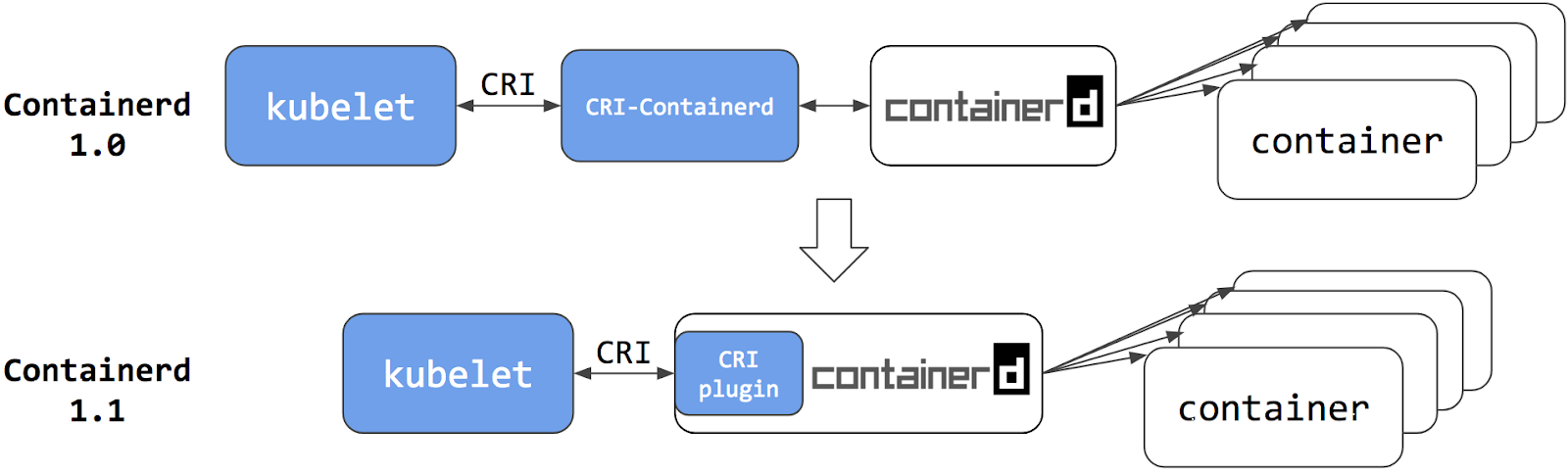
Containerd 1.1 – CRI Plugin (current)

containerd architecture

In containerd 1.1, the cri-containerd daemon is now refactored to be a containerd CRI plugin. The CRI plugin is built into containerd 1.1, and enabled by default. Unlike cri-containerd, the CRI plugin interacts with containerd through direct function calls. This new architecture makes the integration more stable and efficient, and eliminates another grpc hop in the stack. Users can now use Kubernetes with containerd 1.1 directly. The cri-containerd daemon is no longer needed.

What about Docker Engine?

“Does switching to containerd mean I can’t use Docker Engine anymore?” We hear this question a lot, the short answer is NO.

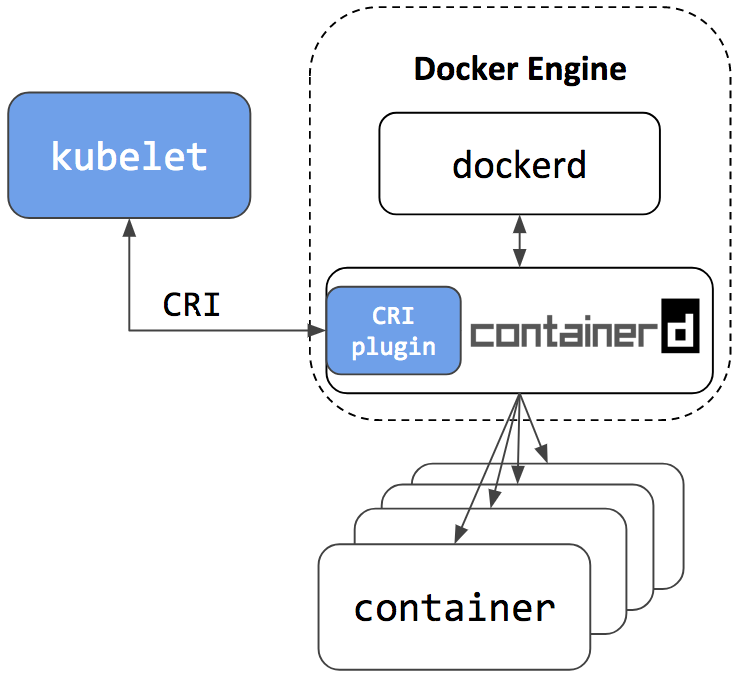
Docker Engine is built on top of containerd. The next release of Docker Community Edition (Docker CE) will use containerd version 1.1. Of course, it will have the CRI plugin built-in and enabled by default. This means users will have the option to continue using Docker Engine for other purposes typical for Docker users, while also being able to configure Kubernetes to use the underlying containerd that came with and is simultaneously being used by Docker Engine on the same node. See the architecture figure below showing the same containerd being used by Docker Engine and Kubelet:

docker-ce