Disclaimer: This blog content has been taken from my latest book:
“Cloud Native Microservices with Spring and Kubernetes”
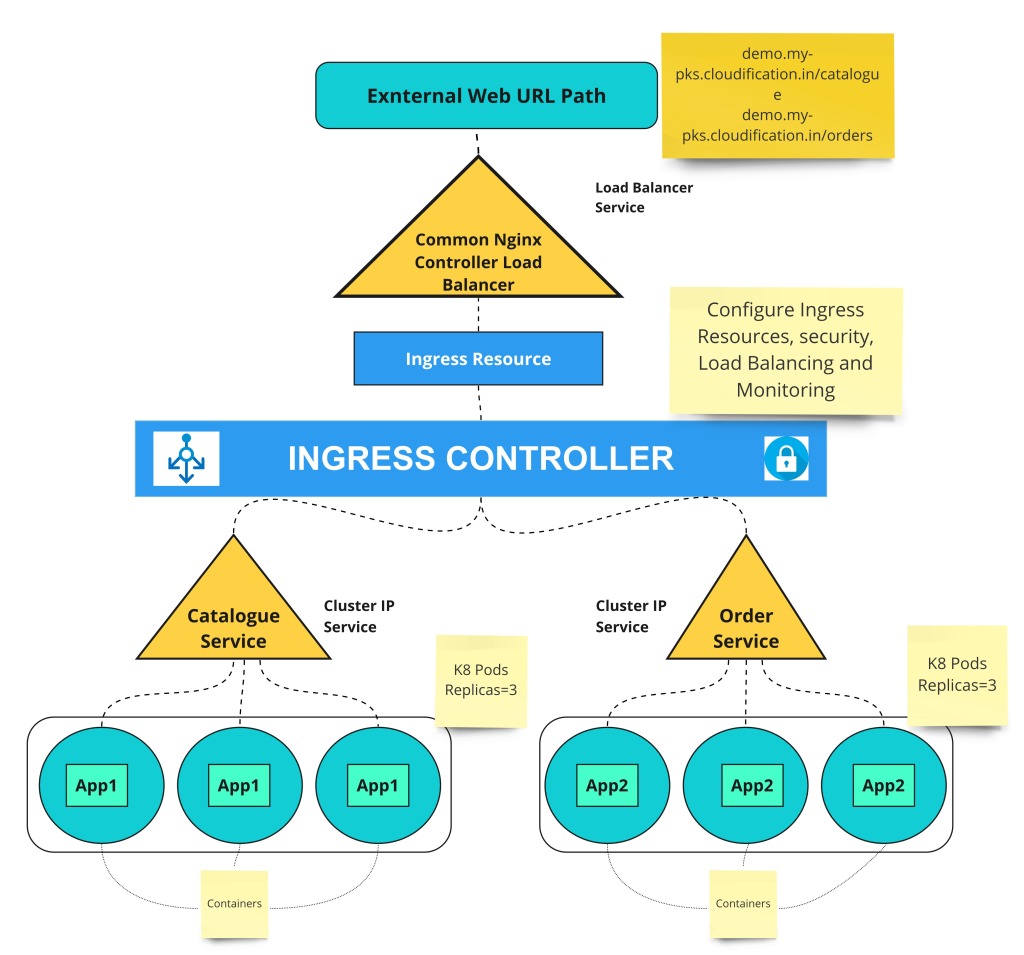
This blog will cover these topics:
- Deployment of SpringBoot (Java) application on container using Kubernetes TKGI cluster
- Run Docker Hub image on VMware TKGI cluster
- Install and configure Helm Kubernetes package Installer
- Install and configure NGINX Ingress controller
- Expose micro-service as ClusterIP ingress REST API resource
- Test and verify Microservice REST API
Prerequisite:
- Step 1 : Create a Springboot microservice. Refer this blog series
- Step 2 : Please follow my blog series -2: Build docker image. Use any of this build method –
- Step 3 : Install Kubernetes cluster and switch to the K8s context where you want to deploy this docker image
- Step 4: Install the TKGI CLI or Kubectl CLI
Create Kubernetes Deployment Configuration
Now, we need to create Kubernetes services and deployments which are required to deploy this sample microservice on K8s.
Please refer this source code for reference: https://github.com/rajivmca2004/catalogue-service/blob/master/catalogue-k8s-deployment.yml
Note (Optional Step) : imagePullSecrets only required to connect with Harbor registry. It’s not required in this demo, because we are going to use Docker Hub image registry. If you are using Harbor then, you need to create a K8s secret and add this in the K8s deployment yaml script.
kubectl create secret docker-registry regcred --docker-server=<your-registry-server> --docker-username=<your-name> --docker-password=<your-pword> --docker-email=<your-email>
# Now, you can add this above secret in deploy script -
imagePullSecrets: # Only required with private image repository like Harbor,jFrog etc
        - name: regcred
1. Create ClusterIP Service:
We need to create a service on “online-store” namespace and expose on port 8010 which will expose this microservice internal to K8s cluster –
apiVersion: v1
kind: Service
metadata:
  name: catalogue-service
  namespace: onlinestore-demo
spec:
  ports:
  - port: 8010
    protocol: TCP
    targetPort: 8010
  selector:
    app: catalogue-service-app
  sessionAffinity: None
  type: ClusterIP #internal IPs withing K8s cluster,exposed to external IP with Ingress Load balancer service
status:
  loadBalancer: {}
2. Create Deployment
Now, create a deployment which will pull image of this micro-service from Docker-Hub image registry from login: itsrajivsrivastava/catalogue-service, which will create 3 replicas/containers of PODs and one container per POD-
apiVersion: apps/v1
kind: Deployment
metadata:
  name: catalogue-service-app-deployment
  namespace: onlinestore-demo
spec:
  selector:
    matchLabels:
      app: catalogue-service-app
  replicas: 3 # tells deployment to run N pods matching the template
  template: # create pods using pod definition in this template
    metadata:
      labels:
        app: catalogue-service-app
    spec:
      containers:
      - name: catalogue-service-app
        image: itsrajivsrivastava/catalogue-service
        ports:
        - containerPort: 8010
          name: server
Install Helm (Optional) for easy deployment on K8s Clusters
https://helm.sh/docs/intro/quickstart/
$ brew install helm
Kubernetes Ingress-nginx Controller Setup with Helm Simplified…Create and Configure Ingress
Read about Ingress- https://kubernetes.io/docs/concepts/services-networking/ingress/
3. Install Ingress-nginx Controller using Helm
Refer this doc for more info:
$ helm repo add ingress-nginx https://kubernetes.github.io/ingress-nginx
$ helm install my-release ingress-nginx/ingress-nginx
#These k8s objects will be created after installing Nginx Ingress Controller- https://raw.githubusercontent.com/kubernetes/ingress-nginx/controller-0.32.0/deploy/static/provider/cloud/deploy.yaml
4. Create an Ingress
Note: You need to create a DNS entry or use direct IP address of Ingress resource for host name.
apiVersion: extensions/v1beta1
kind: Ingress
metadata:
  name: catalogue-service-app-ingress
  namespace: default
spec:
  rules:
  - host: demo.my-pks.cloudification.in
    http:
      paths:
      - backend:
          serviceName: catalogue-service
          servicePort: 8010
        path: /catalogue
5. Test and verify Microservice REST API
Test Nginx Ingress resource from external system terminal/Browser:
curl -v demo.my-pks.cloudification.in/catalogue

 Modern Applications with Cloudification Zone
One thought on “Microservice deployment on Kubernetes container with NGINX Ingress controller, Docker Hub and Helm package deployer”